
Important Notice
Our assistance with filing W‑9 and W‑8 forms is available exclusively to clients who have subscribed to our Bookkeeping service or Scale plan.
If you do not have our accounting service, we provide this guide so you can complete the forms independently.
W‑9 Form (U.S. Suppliers)
-
Who should use it: Suppliers located within U.S. territory, whether individuals or legal entities.
-
Where to find it: IRS Form W‑9 and Instructions Direct PDF link.
Step‑by‑Step Guide to Completing Form W‑9
Field 1 – Taxpayer’s Name
-
Enter the name of the person or company providing the service.

-
For single‑member LLCs:

-
-
Field 1: Owner’s name,
-
Field 2: LLC’s legal name.
-
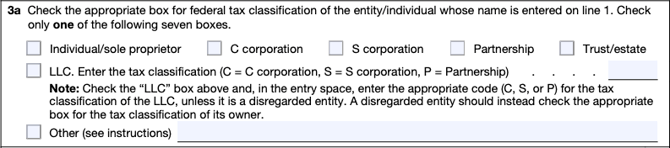
Field 3 – Taxpayer Type
-
Select the appropriate entity type: Individual, LLC, C Corporation, S Corporation, Partnership, or Trust.
-
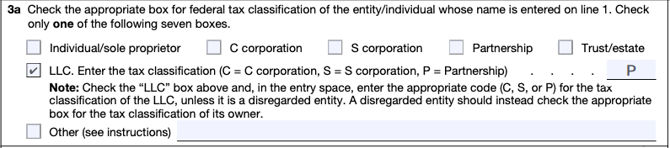
For LLCs, indicate how it is taxed:
-
LLC taxed as a C Corporation → Select “LLC” and enter C.
-
LLC taxed as a Partnership → Select “LLC” and enter P.
-
Field 5 – Address
-
Enter the mailing address.

Field 6 – City, State, ZIP Code
-
Provide full location details.

Part I – Taxpayer Identification Number (TIN)
-
Individual → Social Security Number (SSN).
-
Entity → Employer Identification Number (EIN).

Signature and Date
-
Sign and date the form to finalize it.

W‑8 Forms (International Suppliers)
W‑8 forms are used by foreign individuals or entities (non‑U.S. residents) who receive income from U.S. sources. These forms certify their status as foreign taxpayers and allow them to claim benefits such as reduced withholding tax rates under a tax treaty, if applicable.
-
Form W‑8BEN → For foreign individuals receiving income in the U.S.
IRS Form W-8BEN -
Form W‑8BEN‑E → For foreign entities receiving income in the U.S.
IRS Form W‑8BEN‑E
The W‑8 form collects details about who the person or entity is, where they are from, and what kind of income they receive.
- The forms remain valid until the last day of the third calendar year following the year they were signed, provided the information has not changed.
- Example: A W‑8BEN signed on January 25, 2024, is valid until December 31, 2027.
- These forms are sent only to the payer (the person or entity making the payment), not to the IRS.
How to Fill Out Form W‑8BEN (Foreign Individuals)
Part I – Identification of Beneficial Owner
Field 1
- Enter the full legal name of the person receiving income/dividends/interests from the U.S.:

Field 2
- Enter your country of citizenship.

Field 3
- Provide your complete address, including city, state, ZIP code, and country.

Field 6a
- Enter your foreign taxpayer identification number (TIN) assigned in your country of residence.

Field 7
- For a US Disregarded Entity member, enter the LLC NAME and EIN.

Field 8
- Enter your date of birth in U.S. format (MM/DD/YYYY).

Part II – Claim of Tax Treaty Benefits
- Complete this section only if your country of tax residency has a tax treaty with the United States (for example, certain European countries).
Field 9
- Enter the name of your country of tax residency.
Field 10
- Provide the specific article and paragraph of the treaty that applies, the reduced withholding tax rate, and any additional eligibility conditions required under the treaty.

Part III – Certification
- Write your full name again and check the certification box.

- Sign and date the form, ensuring the date is in U.S. format (MM/DD/YYYY).
- The form can be signed digitally.
How to Fill Out Form W‑8BEN-E (Foreign Entities)
Part I – Identification of Beneficial Owner
Field 1
- Enter the full legal name of the entity receiving income/dividends/interests from the U.S.:

Field 2
- Enter the country of incorporation of the entity.

Field 4
- In most cases, foreign entities are treated as corporations in the U.S., unless they elect to be treated differently.

Field 6
- Provide the complete address, including city, state, ZIP code, and country.

Field 9b
- Enter the foreign taxpayer identification number (TIN) assigned in your country of residence.

Part III Certification
- Write the full legal name again and check the certification box.

- Sign and date the form, ensuring the date is in U.S. format (MM/DD/YYYY).
- The form may be signed digitally.
Summary
- W‑9 → For U.S. suppliers (individuals or entities).
- W‑8BEN → For foreign individuals receiving U.S. income.
- W‑8BEN‑E → For foreign entities receiving U.S. income.
