
1. Signup Phase
To start your migration, go to app.globalfy.com/signup
1.1. Personal Information
Fill out the form with the following details: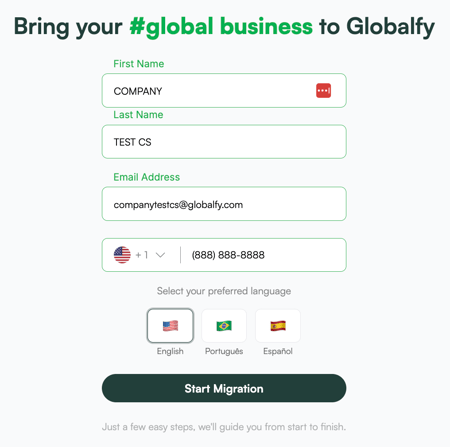
- First name
- Last name
- Email address
- Phone number
- Preferred language
Once you’ve entered your information, click Start Migration to proceed to the next step.
1.2. Basic Company Information
Provide the following information: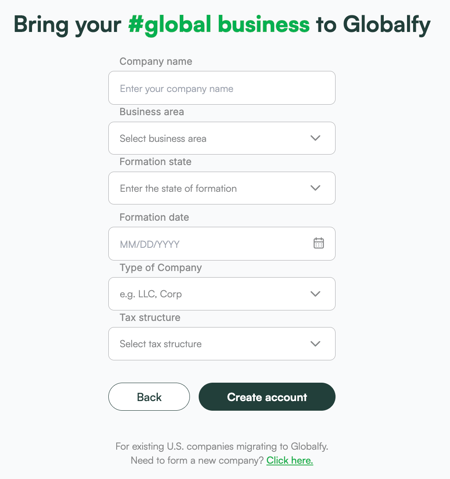
- Company Name
- Business Area
- Formation State
- Formation Date
- Type of Company
- Tax Structure
1.3. Your account has been created!

- Check your email: we sent you a confirmation with a link to create your password.
- Access the platform: once your password is set, you can log in to our platform to complete your setup.
2. Onboarding
2.1. You are almost there!
Complete your migration adding the following data:
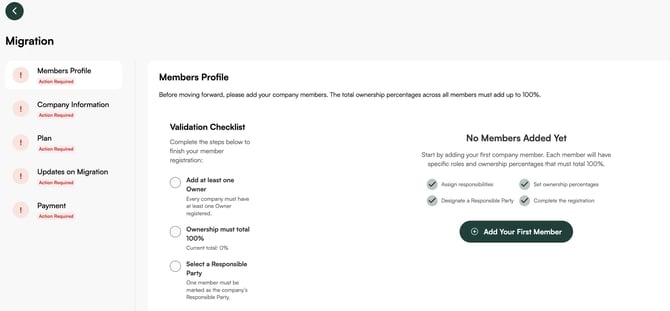
- Members Profile: add your company members (ownership must total 100%)
- Company Information: upload the required company documents and enter the required details.
3. Service Hiring
3.1. Select the plan that best fits your needs.
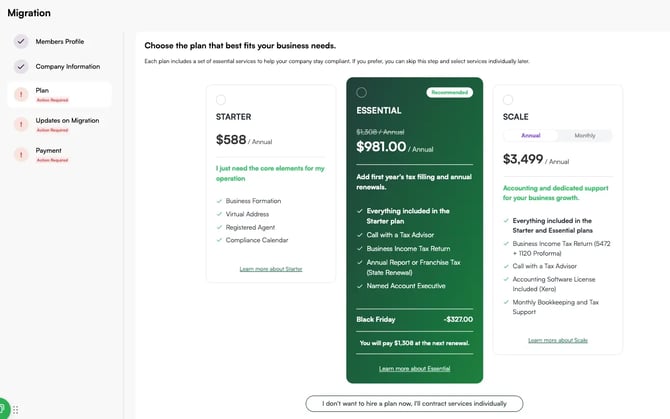
- Choose between our different plans, or talk to one of our Sales Experts clicking here.
- To update your company address with IRS and State, and Registered Agent, simply select these options; they are included in your plan (state filing fee applies).
- Process the payment.
3.2. Hire individual services
- Click on I don’t want to hire a plan now, I’ll contract services Individually.

- Choose the service you need and process the payment.

If you still have any questions or need further assistance with this topic, we are here to help!
✉️ Simply contact us via email at help@globalfy.com or send a WhatsApp message to +1 (866) 428-2030. Our team will be happy to assist you.